It's easy for a day in the field to get away from you. You meet a customer. On the way back to your car, you see a few missed texts and a voicemail. It's another customer on the other side of town with an urgent request better suited to somebody back at the office. Instead, you make the trip even though a phone call would have sufficed. Before you know it, the day is over and you've made half the sales calls you expected. Why? You didn't have a plan. Nothing to stick to. This sales route planner free template is a great first step to building one. Download it below.
The average outside sales rep makes about 5 visits a day. The top 10% of reps make nearly 14 visits a day. Why? The big difference is planning. They aren't getting off track with non-urgent issues. Without a plan, you're subject to the whims of the day. With a plan, you're in control of it.
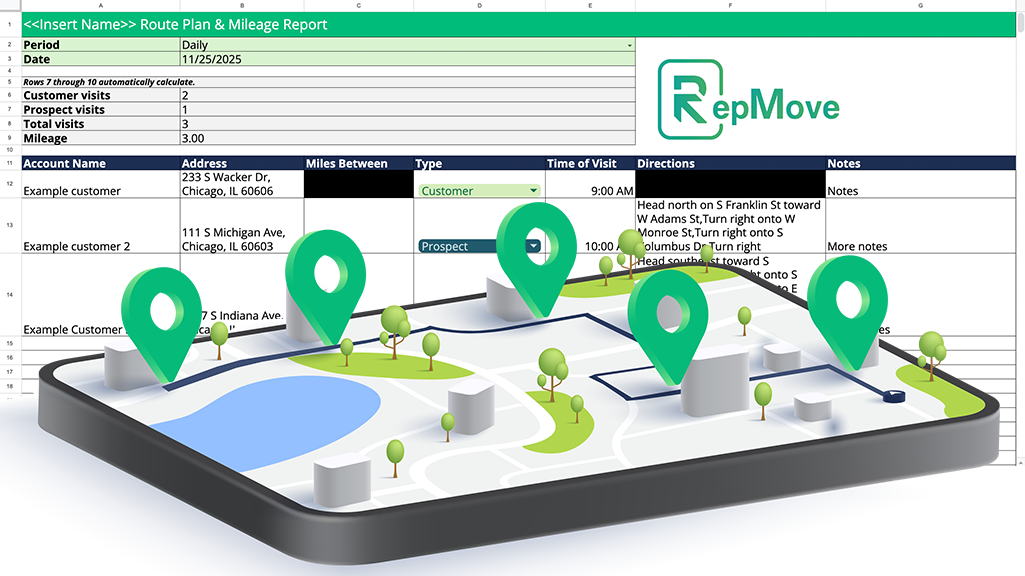
This sales route planner free template is built in Google Sheets, so it’s easy to use and to access on various devices. It connects to Google Maps to automatically calculate the distance between different stops and provide turn-by-turn directions for the quickest route. It additionally captures if visits were to prospects or to customers, so you can measure how time is being devoted to growing new sales. Finally, the sales route planner free template includes a column for tracking notes to help you remember follow-ups and key details.
Use this spreadsheet as a starting framework that you can bend to fit your specific needs.

You may start to outgrow this sales route planner free template quickly. That’s a great sign! That would mean you’ve maxed out the productivity a static spreadsheet can provide. Spreadsheets are great for experimentation, but they are inherently limited compared to a fully-fledged field sales app & platform.
That’s where RepMove comes in. It will take the logic you’re building manually, and not only automate it, but significantly scale it up with new productivity features. RepMove combines route planning and optimization with a complete mobile CRM and activity tracker. It logs mileage and notes automatically to make sales call reports as easy as pressing the export button. It also employs AI-powered follow-ups and note rewriting. That’s just the tip of the proverbial iceberg to what’s possible.
Get a free trial (no credit card required) and download RepMove’s mobile app in the iOS App Store or the Google Play Store.